My Local Business Online

Jan Kearney - Your Local Business Online Marketing Consultant - call me 07847 554418

Jan Kearney – My Local Business Online

Helping you get your business found online by LOCAL people

  • Home
  • Problems I Solve
    • I need a website that works
    • I need more online visibility for my local business
    • I want to start video marketing
    • My WordPress site baffles me
  • Why I Do It
    • Privacy
  • Toolbox
  • Contact Me
You are here: Home / Facebook / How to Disable the Facebook Notification Beep and Get Your Life Back

How to Disable the Facebook Notification Beep and Get Your Life Back

April 11, 2013 by Jan Kearney

I’m going to admit to something that I never thought would happen to me.  The Facebook notification beep has me trained like Pavlov’s Dog…
disable facebook notifications

A couple of weeks ago I started noticing a weird intermittent beeping sound from the laptop.  With all the tabs and windows I have open, it took a while to track down.  Finally, I found it – the Facebook notification beep.

It didn’t particularly bother me.  Not being a naturally social person, I am immune to the call of Facebook (or so I thought).  And, I rarely hear anything because the headset is usually plugged in even when I’m not using it.

Until the Muppet pup chewed the headset…

Over the weekend as I came in from walking the Muppet, I heard the BEEP.  I didn’t even take off her lead and checked Facebook…

Last night as I was cooking – BEEP.  I came in from the kitchen and checked Facebook.

This morning, mid-type – BEEP.  I stopped what I was doing and checked Facebook.

Enough is enough, the Facebook notification sound had to go!

How to Disable the Facebook Notification Beep

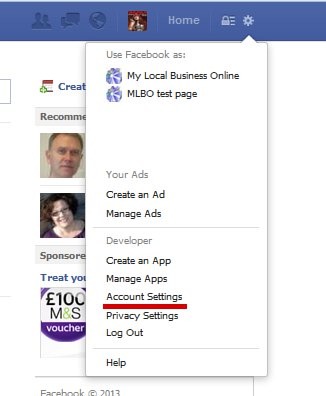
Log into Facebook and click on the gear icon at the top of the page.  A drop down menu will appear with the pages you manage and other settings.  Select account settings, it will open a new page.
disble facebook beep - account settings

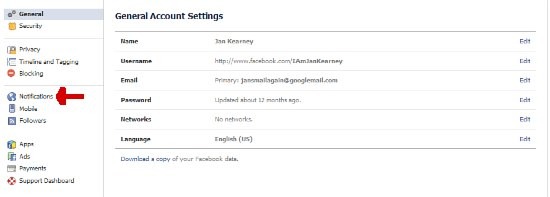
You’ll be shown the General Account Settings page.  Over on the left menu choose notifications
turn off Facebook beep - notification settings

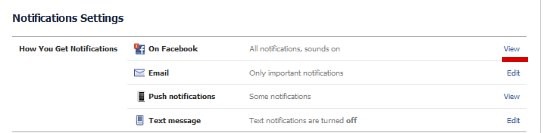
The next screen is Notification Settings.  Right at the top is “On Facebook”.  Click the view link.
Facebook notification settings

The “On Facebook” settings section will expand.  Untick the “Play a sound when each new notification is received” box and click save changes.
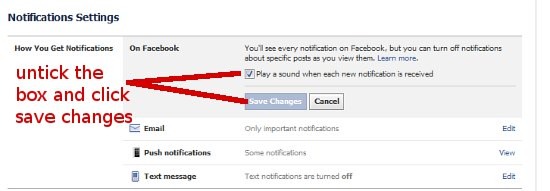
Turn off Facebook beep

Now I have my life back and working on de-conditioning myself!

Over to you…

Has Facebook trained you to answer it’s call?

How to Disable the Facebook Notification Beep and Get Your Life Back by Jan Kearney

Opt In Image
5 Steps To Local Business Facebook Success
Make Your Local Business Facebook Page Work For You

This free short report guides you through the 5 essential steps to make your local business Facebook Page work for you.  Discover:

  • How to find your audience on Facebook
  • How to optimise your page so people find you “nearby”
  • The types of updates you should be posting

Download your report and get started today.  Simply fill in your details  in the boxes above and I'll whizz the report over to you!

Don't worry, I despise spam too, your details will never be shared, sold, passed on, traded or any other jiggery pokery!


Related Posts

  • How to Install The Facebook Recommendations Bar

    The New Recommendations Bar Earlier this week, Facebook announced a new recommendation bar.  There's been…

  • Two ways to block facebook game requests
    How To Block Facebook Game Requests

    Facebook Game Requests - do you love or loathe them? I think we all have…

  • Get to the top of Google? Searching for Answer on Internet
    What Is The Best Way To Get To The Top Of Google?

    It's easy to get to the top of Google search rankings... Honest, it is. Anyone…

Filed Under: Facebook Tagged With: facebook, Facebook timeline, How To Guides

About Jan Kearney

I believe that every business, no matter how small or how local can use the power of the web to gain more customers. I offer no bull coaching and mentoring so small business owners can strategically put the web to work for their business. I've been called a "compass" and a "navigator" and probably a few more names that aren't suitable for a profile!
Connect with me on Google+, Facebook, Pinterest

Comments

  1. Linda Ann - Delightfully Amiss: Berzerkians Gone Amok ... and Finding the Funk in Dysfunction says

    April 11, 2013 at 2:18 pm

    Good tips for Facebookers.
    I usually just turn the volume down on the PC. So many sites have music or auto-load videos. When I have multiple tabs open, those jumble and make a ruckus. Ugh!

    Happy A-Z. Stopping by from UBC group.

    • Jan Kearney says

      April 11, 2013 at 2:53 pm

      Same here, Linda – I was so used to no sound. Either everything is closed except what I am doing when the headset was on, or the headset was still connected with me not wearing it!
      Thanks for popping in and enjoy the UBC 🙂

  2. Darlene Cary says

    April 11, 2013 at 5:57 pm

    Jan – Thanks so much for this tip! I interview women online on my podcast, and so often these FB beeps come thru and are so distracting. I will add this tip to the guidelines I send interviewees beforehand.

    • Jan Kearney says

      April 12, 2013 at 11:19 pm

      I’m pleased the post will be useful Darlene. The FB beeps are very distracting! Thanks for popping in 🙂

  3. Joy Healey says

    April 11, 2013 at 10:18 pm

    Peace! Thanks Jan. Perfectly explained 🙂

    Joy

    • Jan Kearney says

      April 12, 2013 at 11:19 pm

      Haha – yes peace at last, Joy 🙂

  4. Toni Nelson says

    April 12, 2013 at 12:34 pm

    Thanks sooo much for this post! I noticed it too and had no idea how it was happening. Now I can turn it off. FYI comment luv is posting an older post so now I have to get that fixed next:)

    • Jan Kearney says

      April 12, 2013 at 11:21 pm

      Has your feed updated Toni? Glad this post helped you out – thanks for popping in 🙂

  5. Toni Nelson says

    April 13, 2013 at 3:50 am

    My feed still hasn’t updated. I tried to post on a few sites I regularly post on and tried to copy the url to my current post. One site let it go through the other didn’t. http://toninelsonmeansbusiness.com/keep-going-after-your-dreams-katie-couric/

    • Jan Kearney says

      April 13, 2013 at 11:50 pm

      That’s really strange – click on your feed and it is up to date. Wonder why commentluv isn’t pulling it in? Perhaps that’s one for their support desk?

  6. Carlana says

    April 14, 2013 at 5:24 pm

    Great post. Been trying to turn off the notifications for the UBC group because each time an update us made my BlackBerry alerts. Just want to login and see the updates.

Meet Jan Kearney

I believe that every business, no matter how small or how local can use the power of the web to gain more customers. I offer no bull coaching and mentoring so small business owners can strategically put the web to work for their business. I've been called a "compass" and a "navigator" and probably a few more names that aren't suitable for a profile!
Connect with me on Google+, Facebook, Pinterest or Discover More About My Local Business Online…

Also On The Blog…

7 Useful image optimisation tips for search and social media

7 Useful Image Optimisation Tips For Search And Social Media

A web page without an image is almost naked, missing something, a finishing touch. Basic image optimisation can transform your web pages, product … [Read More...]

50 Fabulously free stock photo sites to bling up your blog

50 Fabulously Free Stock Photo Sites To Bling Your Blog

Not all of us have photographic talent. Creating your own photo images for your website, social updates, blog or presentations is HARD.  When the … [Read More...]

Is your business website Google-worthy in 2016?

Is Your Business Website Google-Worthy In 2016?

Creating your own local business website is never an easy task, especially when the guidelines change regularly. As always online, the only thing you … [Read More...]

Jan Kearney
and My Local Business Online
Helps small business owners get to grips with the web and get found online.
2 Stanley Villas, Greenway Road, Runcorn, Cheshire
Phone: 07847 554418

You need to know

This website uses cookies. By continuing using the site, you are agreeing to the use of cookies. Info on the cookies used can be found in my privacy policy.

Jan Kearney is a participant in the Amazon EU Associates Programme, an affiliate advertising programme designed to provide a means for sites to earn advertising fees by advertising and linking to Amazon.co.uk.

More Info

  • Contact Me
  • About
  • Privacy

Copyright © 2026 · My Local Business Online · WordPress · Log in